Skip to content

Every load, from rate con to paid.

Upways Freight is the TMS your office runs loads in.

From$19a truck a monthEarly accessPro $29, $24 from 51 trucks

What Freight does for you.

Rate cons become loads.

Upways reads the rate confirmation and fills the load: broker, MC, every stop with its window, rate and miles. Anything it could not read is marked for you. You check the load before it is saved, or let it save on its own and review it after.

What it saves youTyping a rate con into a form, stop by stop.
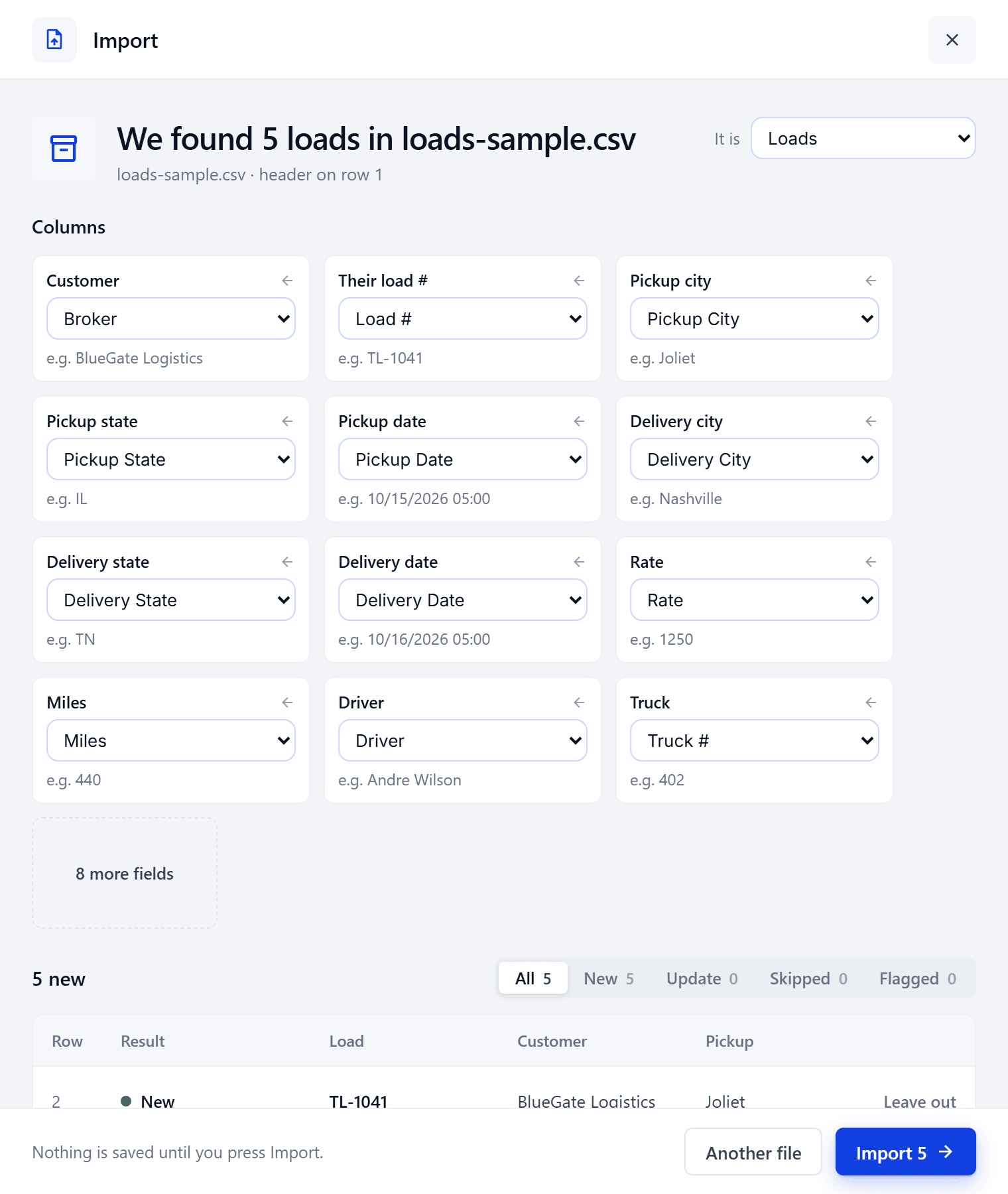
Bring your loads with you.

Drop a spreadsheet or your current system's export. Every column is matched for you, and nothing is saved until you press Import. Drivers, trucks and customers come in the same way.

What it saves youRetyping your business to switch.

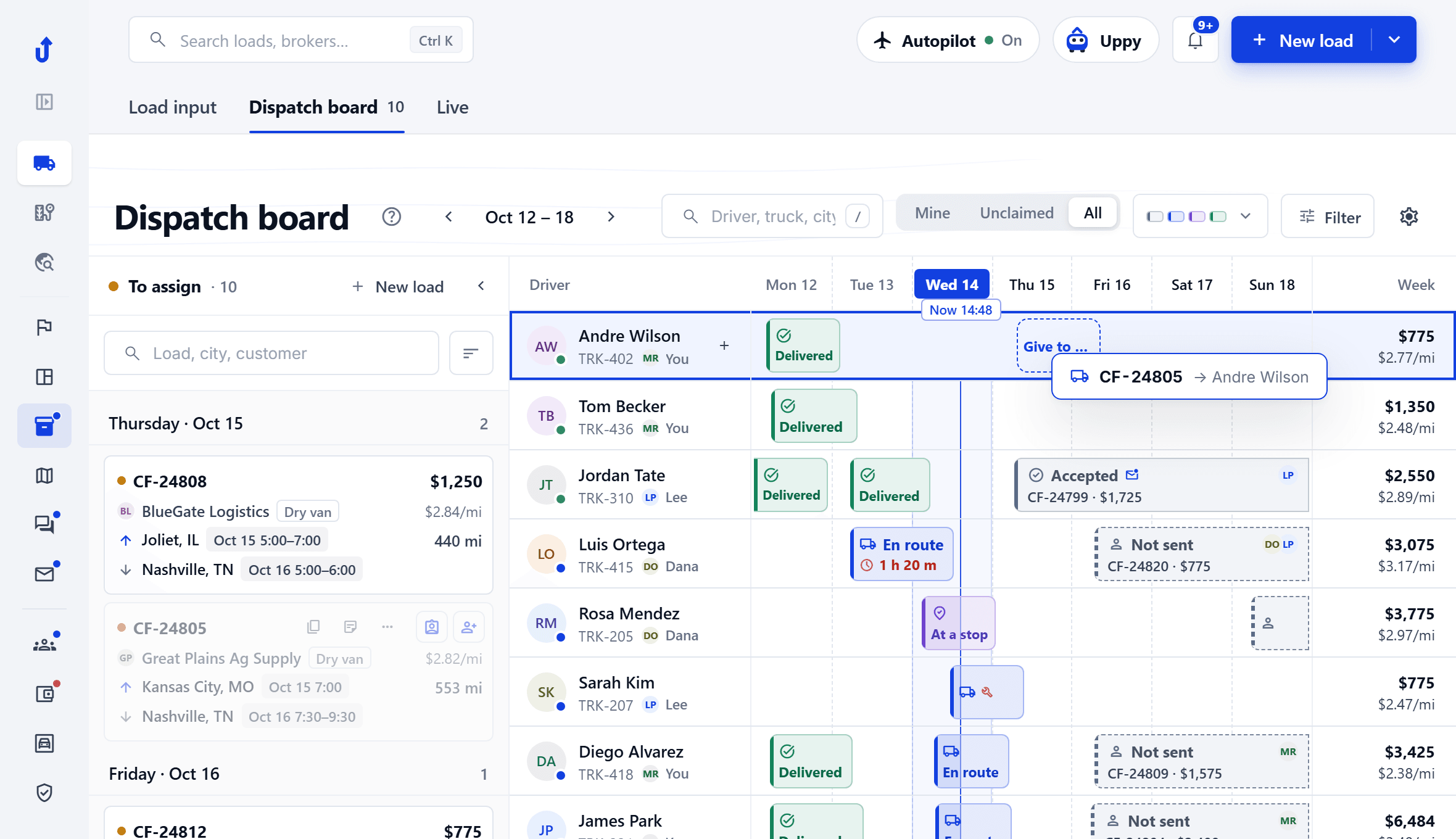
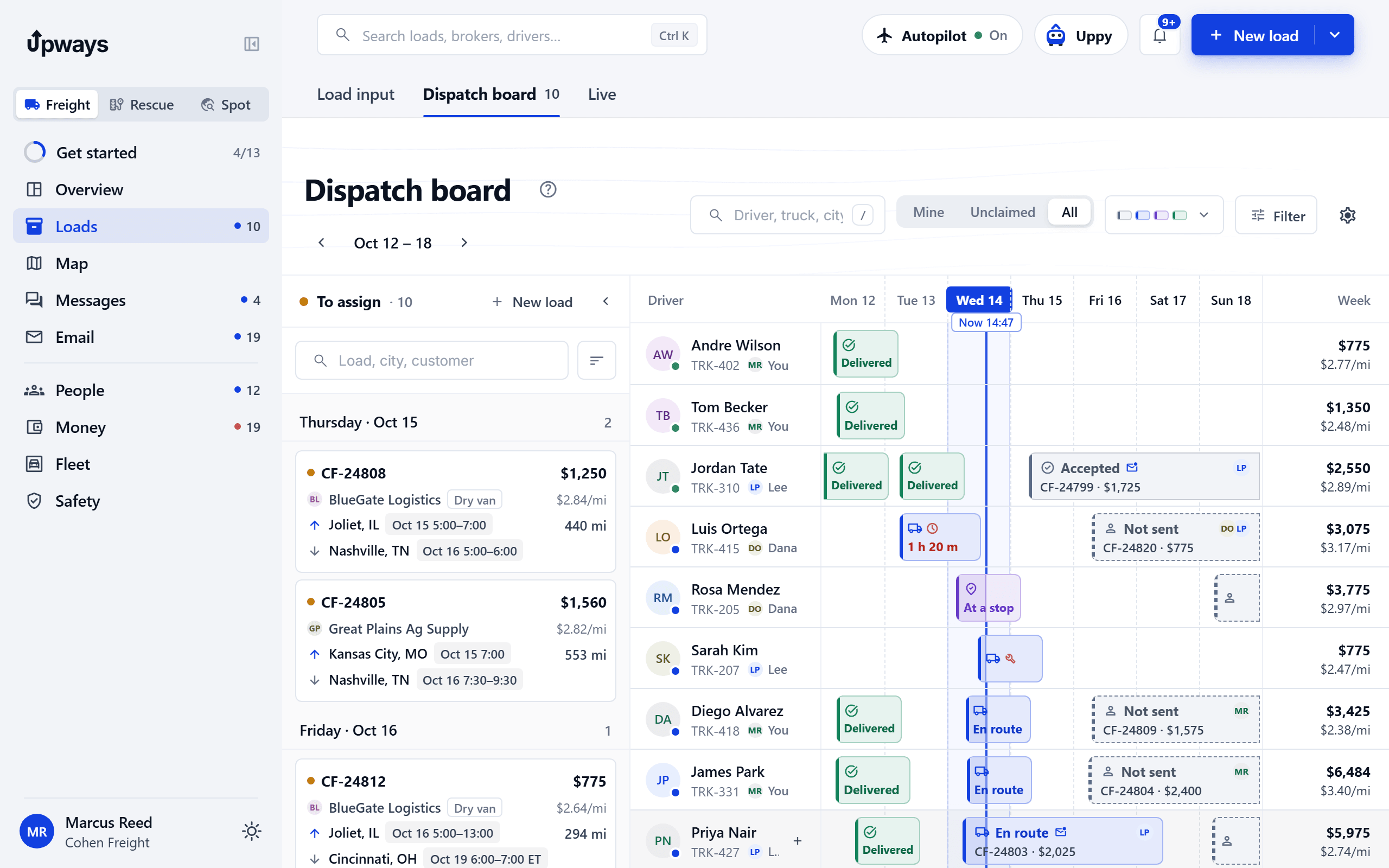
Drag a load onto a driver.

The week on one board. Drag a load onto a driver to assign it; To assign holds what still needs a truck.

What it saves youClicking through a form to assign a load, and a second screen to see who is free.

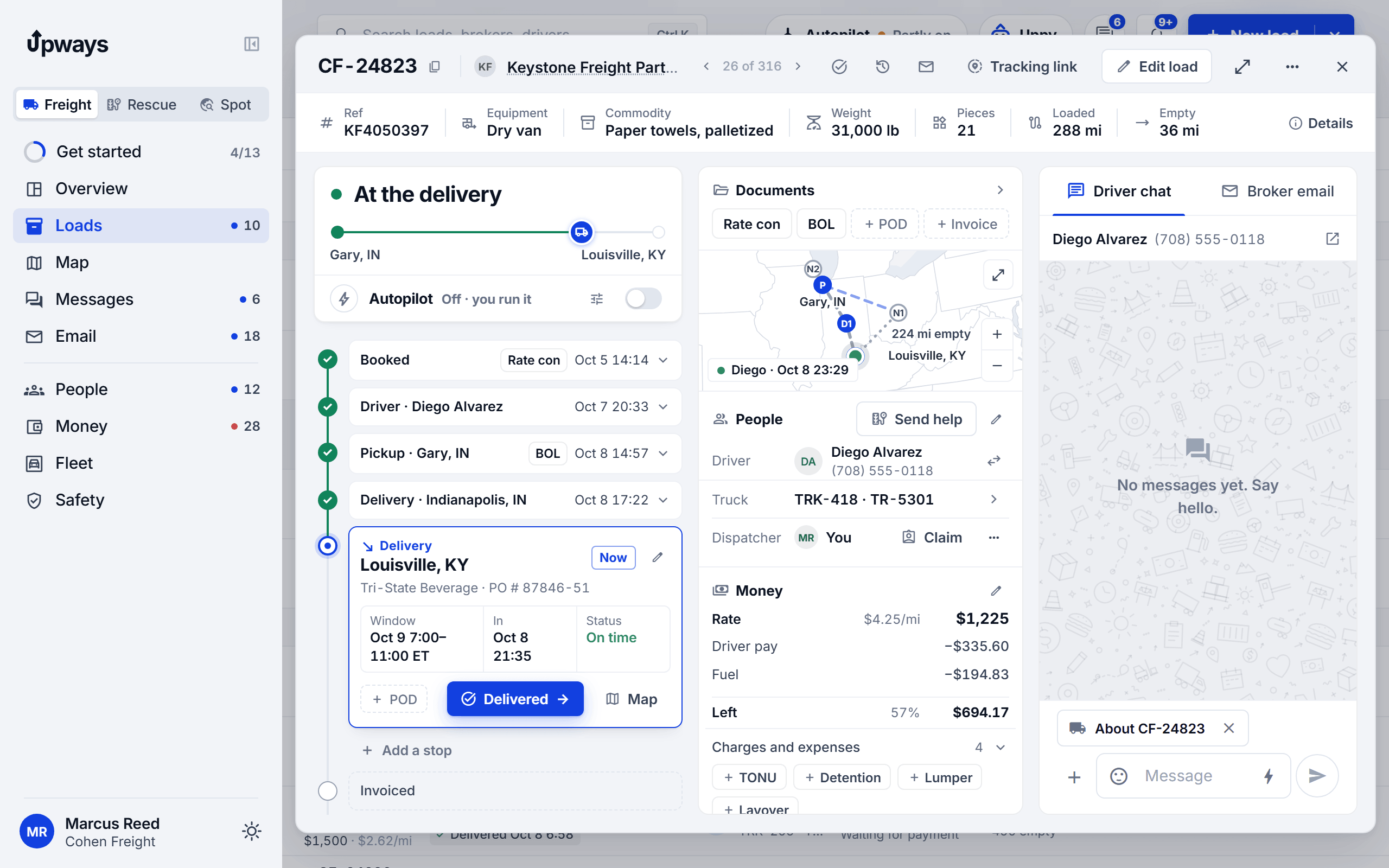
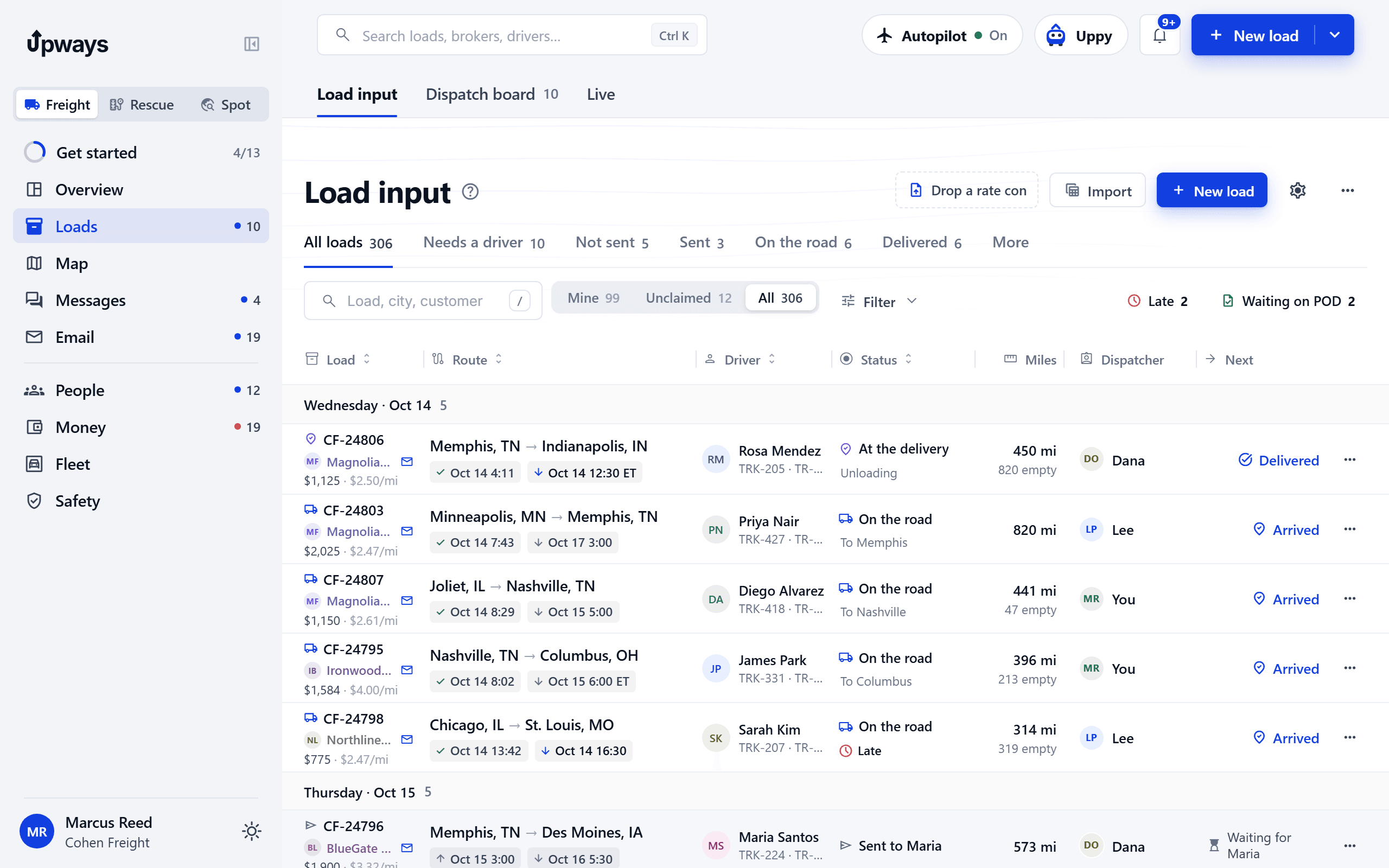
Every load on one screen.

Stops, documents, the chat with the driver, the history and the money of a load, without scrolling sideways.

What it saves youHunting through tabs while a broker waits on the phone.

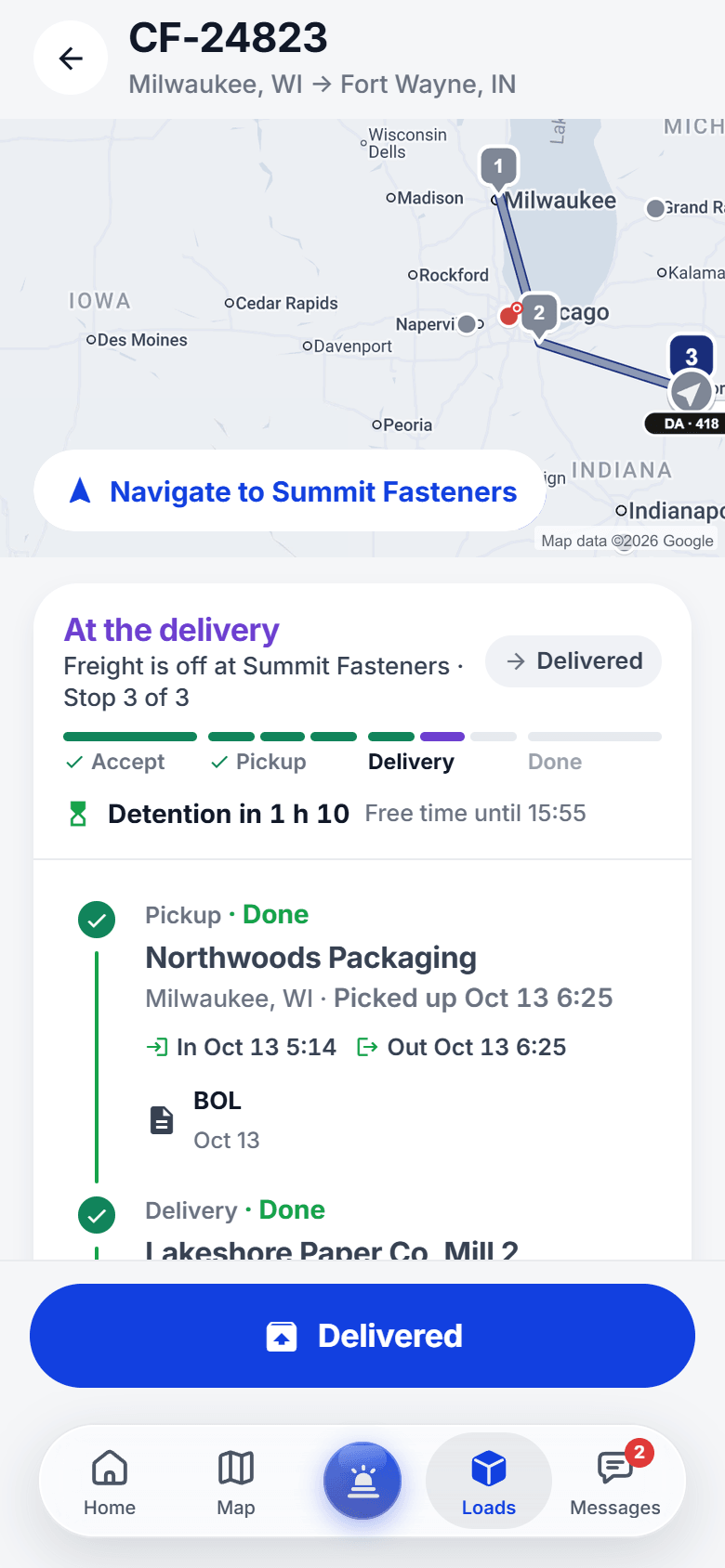
The driver's phone walks him through every stop.

His loads in the Upways app: each stop in order with its window, one button for the next step, Navigate, the detention clock, and the BOL and POD snapped right at the dock.

What it saves you"What's next?" calls, and paperwork that shows up a week late.

The driver app load screen: the route on a map from Milwaukee to Gary to Fort Wayne, Navigate, where the load stands, detention time and each stop with its times and papers

Autopilot does the routine work.

The routine work runs itself: check ins with drivers, broker updates, POD reminders, rate cons turning into loads, and alerts when a truck is late, stopped, slow at a dock or a load has no driver. Each job is its own switch, and everything it did is a line in the load's history.

What it saves youHours a day of check in calls, POD chasing and watching dots on a map.

Autopilot didOn
  • 14:02Asked Diego Alvarez for a check in on CF‑24807
  • 14:10Asked for the POD on CF‑24823
  • 14:25Told you Sarah Kim will be late in St. Louis
  • 14:31A rate con from Northline Logistics became CF‑24830Waits for you

Late is said once, the same everywhere.

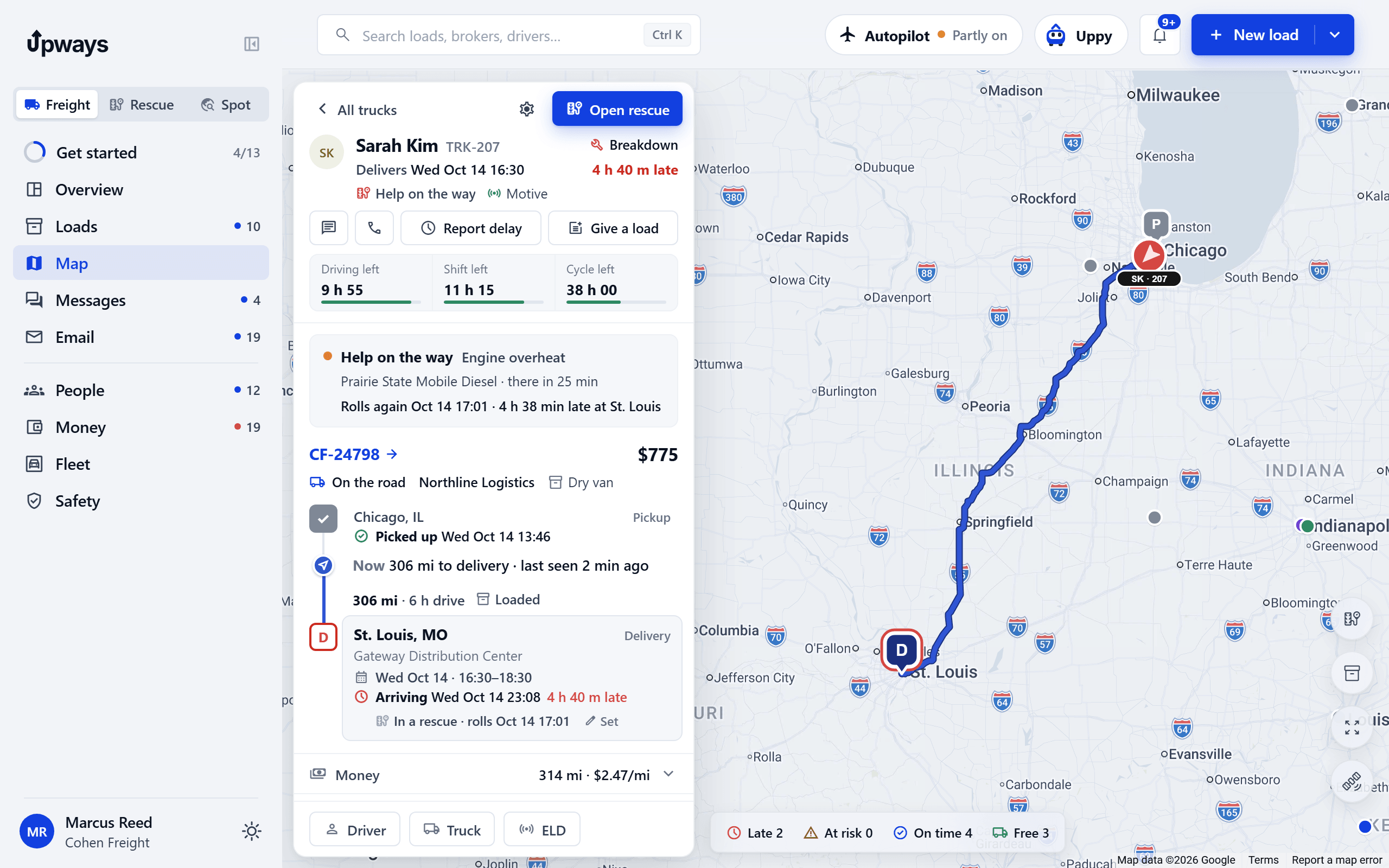
How late a truck is comes from one place, so the board, the map, Live and the office phone all say the same thing. If the truck is in a roadside repair, the arrival time counts the repair.

What it saves youTwo screens arguing about how late a truck is.

Every truck on a live map, and a link for the broker.

Every truck on one live map from the driver app, with ETAs. Share a tracking link with the broker: pickup and delivery, each stop's status and the truck's rough position. The link never shows the rate, the driver's name or phone, or addresses. It ends 7 days after delivery and you can turn it off any time.

What it saves youThe broker's "where is my load?" calls.

Tracking for KF4050397
  1. PickupGary, INPicked up Oct 8 14:57
  2. DeliveryLouisville, KYETA Oct 8 21:35 · On time

Truck near Seymour, IN · 12 min ago

Never on the link
  • Rate
  • Driver's name
  • Phone
  • Addresses

Ends 7 days after delivery

Factoring with Freight Pro

Invoice the day the POD is in.

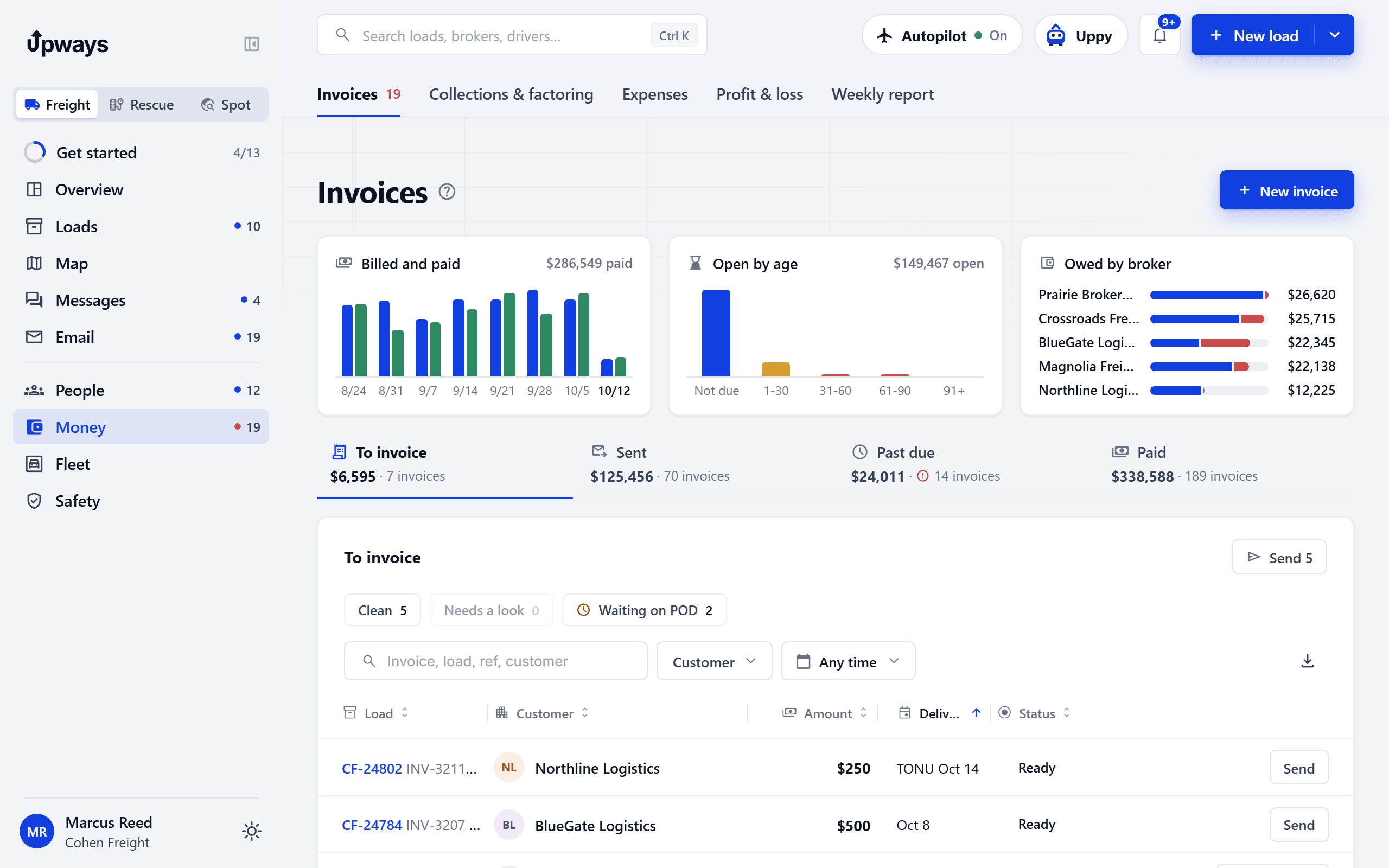
Invoice when the POD is in, email it to the broker, or send the factoring packet in one press. Collections shows who is late.

What it saves youDays between delivery and the invoice, and money that sits unbilled.

Freight Pro

Driver pay that adds itself up.

Set a pay rate on the driver once. Weekly statements make themselves: To review, Approved, Sent, Paid. An approved statement stays as it was; a fix goes on the next one.

What it saves youPayroll night with a calculator and a stack of rate cons.

Diego AlvarezOct 5 to 11To review
CF‑24807 Joliet to Nashville441 mi × $0.72$317.52
CF‑24790 Gary to Louisville288 mi × $0.72$207.36
Detention, CF‑247902 h × $25$50.00
Advance paid backOct 7−$100.00
To pay$474.88
Freight Pro

What every load really left you.

Each load shows the rate, the driver's pay, fuel and what is left. Profit by load, truck, driver and lane, from the loads and expenses you already entered.

What it saves youFinding out at tax time which lanes lost money.

Also in Freight

  • Uppy, the assistant

    Ask about your loads, drivers and money in plain words. Uppy can also add a driver from a CDL photo, add a truck or bring in a spreadsheet for you. Uppy can only do what you yourself are allowed to do, and every change it makes has an Undo.

  • Messages with drivers

    Chats with each driver and groups, with the load or rescue they are about.

  • Trucks and drivers in order

    Maintenance, truck inspections, IFTA and MPG, documents with due dates, and hiring with an apply link. Add a driver from a photo of his CDL.

  • Customers and brokers

    Every customer with their loads, invoices and how fast they pay.

Coming later
  • QuickBooks. Send invoices and customers to QuickBooks.

Freight, or an older TMS.

Freight compared with an older tms
The jobAn older TMSUpways
Enter a loadType the rate con into a form.Drop the PDF. The load fills itself and you check it.
Give it to a driverPick a name from a list on the load form.Drag the load onto his week.
The driver's sideOften calls, texts and photos sent to someone's phone.His loads, stops, navigation and papers in the Upways app.
Check ins and PODsA dispatcher calls and chases.Autopilot asks, reminds and alerts. Each job is a switch.
AIUsually not built in.Rate cons read for you, Autopilot and an assistant, all with you in charge.
Pay and profitOften exported to a spreadsheet and added up by hand.Statements and profit from the loads you already entered.
Getting startedOften a setup fee, training calls and a yearly contract.No setup fee, month to month, your data imported from a spreadsheet.

Built for how trucking works now.

  • AI built in, you in charge

    Each agent is its own switch. Emails to brokers wait for your Send unless you change that.

  • One system, not three

    Freight, Rescue and Spot share the same drivers, trucks, documents and expenses. Add one later and everything carries over.

  • Apps for the whole team

    An iPhone app for drivers, one for the office on the move, and one for owner operators.

  • Works in the browser

    The office opens Upways in any modern browser. Nothing to install.

  • The office is free

    Rescue and Freight are priced per truck. Owners, dispatchers and office staff do not count.

  • Month to month

    No setup fee and no long contract. Cancel online in Billing any time.

Questions

Can I get Freight and Spot today?

Yes. Book a demo and we show you both on a sample fleet, then set your company up. Freight is in early access.

Can I bring my data from my current system?

Yes. Import drivers, trucks, customers and loads from a spreadsheet or your current system's export. You review every column before anything is saved.

What counts as a truck?

A driver on the road in your company. Owners, dispatchers and office staff are free. The more trucks you have, the lower the price per truck.

Does the AI send emails without asking me?

Not unless you tell it to. The AI agents are off until the company owner turns them on, and Review first is the default, so every email waits for your Send. They keep to your limits, never go below your floor price, and stop and ask you when anything looks unusual.

See Freight on a sample fleet.